 CalScout
How to schedule a meeting across time zones
Find the hours when both of you are inside your working day, offer two or three times in that window, and write each one in both time zones, with the date on their side when it differs. Use city names rather than abbreviations, and check the calendar in March, April, October and November, when daylight saving moves the gap.
Most cross-time-zone mix-ups come from three things: a time written in one zone only, an abbreviation that means two places, or a daylight-saving change that one side forgot. Each is easy to avoid.
Updated November 9, 2026.
1. Find the hours you share
Line up both working days and look for the overlap. Between the US East Coast and London it's about three hours, the New York morning and the London afternoon. Between the US West Coast and London there's none at all inside a 9-to-5 day, so someone has to start early or stay late. The table below shows common pairs.
2. Share the inconvenient hours
When there's little or no overlap, offer some times early in your day and some late, rather than always asking the other person to stretch. For a recurring meeting, alternate the slot so the same person isn't always the one on a call at 7 AM.
3. Write each time in both zones
- Both zones on every line: “Tue, Jan 12 · 4:00 – 4:30 PM PST (Wed, Jan 13 · 9:00 – 9:30 AM JST)”.
- The date on their side when it changes. An afternoon on the US West Coast is already the next morning in Tokyo or Sydney.
- Cities when abbreviations are ambiguous. IST can mean India, Ireland or Israel, and CST can mean US Central or China. “4 PM London time” can't be misread.
- Their zone first if you like. It's a small courtesy that saves them converting.
4. Watch the daylight-saving weeks
Countries change their clocks on different dates, and some never do. In 2027 the US moves its clocks forward on March 14 and back on November 7. The UK and the EU do so on March 28 and October 31. For two weeks in March and one week around the start of November, the gap between New York and London is four hours instead of five. Australia's seasons run the other way: Sydney's daylight saving ends on April 4 and starts again on October 3. India, Japan and Singapore don't change their clocks at all.
If a meeting repeats across one of those dates, the time may move by an hour for one of you. Check the first meeting after each change.
Working hours that overlap: common pairs
Overlap inside a 9 AM to 5 PM working day on both sides, in January and July 2027.
| Cities | January | July |
|---|---|---|
| Vancouver – New York | 6 h: 9 AM – 3 PM Vancouver = 11 AM – 5 PM New York | 5 h: 9 AM – 2 PM = 12 – 5 PM |
| New York – London | 3 h: 9 AM – 12 PM New York = 2 – 5 PM London | 3 h: the same |
| New York – Berlin | 2 h: 9 – 11 AM New York = 3 – 5 PM Berlin | 2 h: the same |
| San Francisco – London | None. With an 8-to-6 day: 8 – 10 AM San Francisco = 4 – 6 PM London | None. With 8 to 6: the same 2 hours |
| London – Mumbai | 2.5 h: 9 – 11:30 AM London = 2:30 – 5 PM Mumbai | 3.5 h: 9 AM – 12:30 PM = 1:30 – 5 PM |
| London – Singapore | None. With 8 to 6: 8 – 10 AM London = 4 – 6 PM Singapore | 1 h: 9 – 10 AM London = 4 – 5 PM Singapore |
| San Francisco – Tokyo | 1 h: 4 – 5 PM San Francisco = 9 – 10 AM Tokyo, the next day | None. With 8 to 6: 4 – 6 PM = 8 – 10 AM, the next day |
| San Francisco – Sydney | 3 h: 2 – 5 PM San Francisco = 9 AM – 12 PM Sydney, the next day | 1 h: 4 – 5 PM = 9 – 10 AM, the next day |
Worked out from the time-zone rules for 2027. Daylight-saving dates follow current law in each country.
Doing it with CalScout
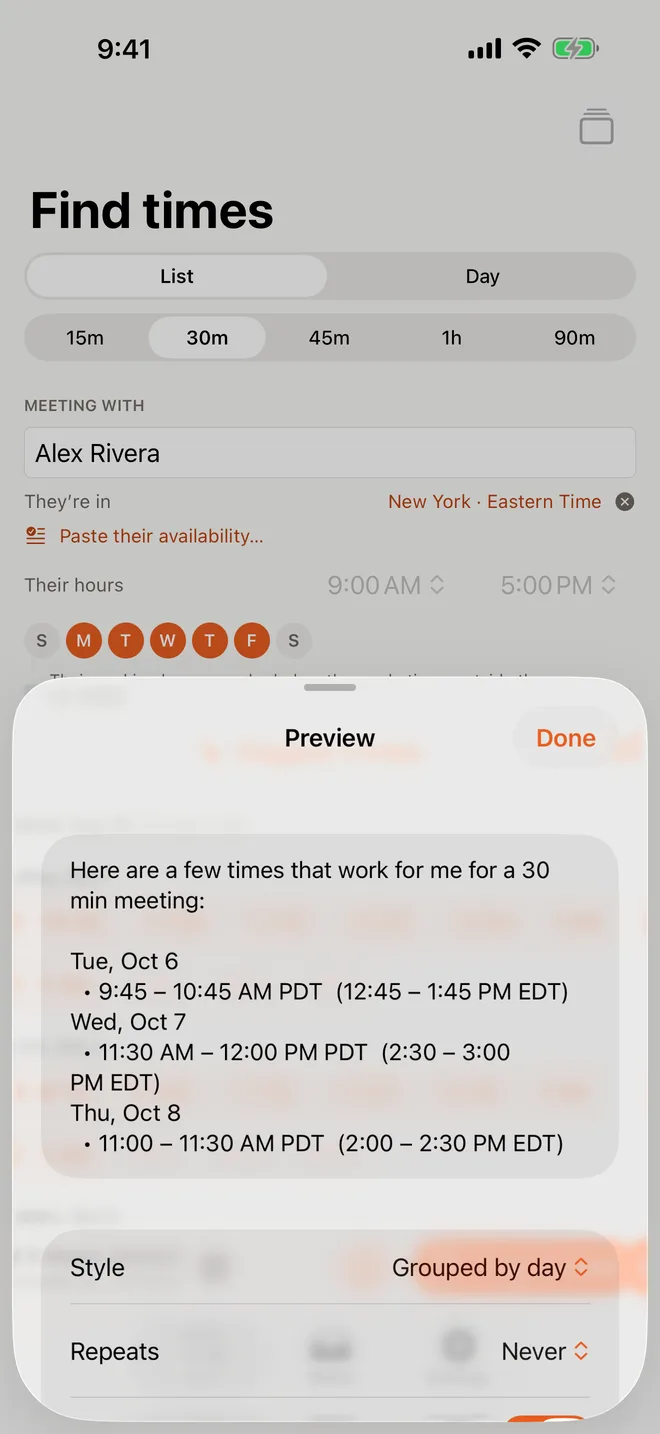
Add the other person's time zone and it appears beside yours on the week, so you can see at a glance which of your open slots fall in their day. Pick the times by clicking or dragging over them, and Copy & Hold writes each one in both zones, with the date on their side when it's already tomorrow there, and holds them on your calendar until they reply.
With CalScout Pro you can add a second extra zone for a three-way call, and save where the people you meet are and when they work, so the times outside their day fade on the week.
See also how to offer meeting times without a booking link and how to find a time with several people.