 CalScout
 vs Calendly
It depends on who's booking whom. Calendly gives you a booking link: good when many people need to book you, such as sales calls, interviews or office hours. CalScout sends a few times as a plain message instead, which they answer with a reply such as “2”: good for the one-off meeting, where a short message may be easier for them than a booking page. Many people use both.
Updated November 9, 2026. Calendly's details are from calendly.com and its help centre as of that date.
Which one suits you?
Calendly suits you if…
- lots of people book time with you, often people you haven't met;
- you want them to choose from all your open slots, at any hour, without a reply from you;
- you need features like round-robin, routing forms, payments or CRM integrations;
- you work on Windows, Android or the web.
CalScout suits you if…
- you're asked “Can you send me a few times?” and want to answer in one message;
- you want them to answer in plain words, with no page to open;
- you're arranging a one-off meeting with a colleague, client or guest, and would rather offer a few times than send a booking page;
- you want the offered times held on your calendar until they reply, so nothing else takes them;
- you use an iPhone, iPad or Mac, and want no account and no data leaving your devices.
Side by side
| CalScout | Calendly | |
|---|---|---|
| What they receive | Two or three times, written as plain text in a message you send anywhere | A link to your booking page, or chosen times inserted into an email as links |
| What they do | Reply, for example “2” | Click a time and book it on Calendly's page |
| After they choose | You press Confirm: the chosen hold becomes the meeting and the others are removed. With Pro, you can share a calendar invite they add with a tap. | The meeting is booked straight away, and both of you get an invite |
| Who chooses the options | You | Usually they do, from your open slots; you can also send chosen times as a one-off meeting |
| Holding the times | Tentative holds on your calendar until they reply; the rest let go when you confirm | A slot is booked when they pick it; one-off meetings can reserve the offered times |
| Time zones | Add their zone and each time reads in both | The booking page shows times in their zone |
| Several people | Paste when others said they're free and see the overlap (Pro) | Meeting polls and team scheduling |
| Calendars | Everything in Apple's Calendar: iCloud, Google, Exchange, Outlook, subscriptions | Connected accounts: one on Free, more on paid plans |
| Account | None, for you or them | You sign up; people booking you don't need an account |
| Your data | Read on your device; nothing collected | Managed through Calendly's online service |
| Devices | iPhone, iPad and Mac | Web, iPhone, Android and browser extensions |
| Price | Free; Pro is $19.99 once, with a 14-day free trial | Free plan with one event type; Standard from $10 per seat a month, billed yearly |
Prices in US dollars, as of November 2026. The two aren't priced like for like: CalScout Pro is a one-time purchase, while Calendly's paid plans are subscriptions that include booking automation and business features.
What the other person sees
With CalScout, the message is plain text you paste into email, Messages, Slack or anything else. This is the exact text it writes, in its Numbered style:
Here are a few times that work for me for a 30 min meeting: 1. Tue, Jan 12 · 10:00 – 10:30 AM PST (1:00 – 1:30 PM EST) 2. Wed, Jan 13 · 2:30 – 3:00 PM PST (5:30 – 6:00 PM EST) 3. Fri, Jan 15 · 11:00 – 11:30 AM PST (2:00 – 2:30 PM EST) Just reply with the number that works best (1–3).
2 works for me!
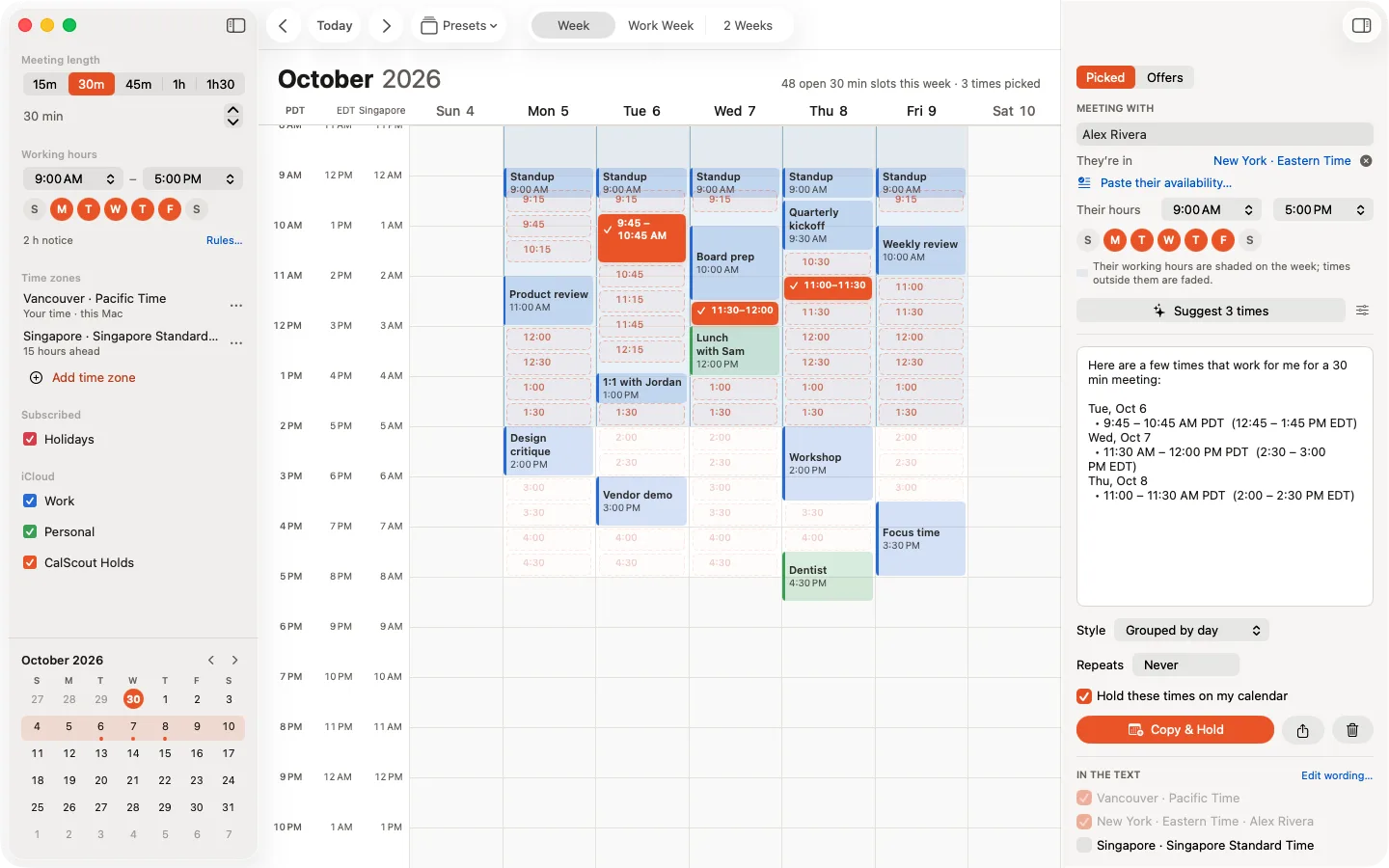
On your side: pick the times on your week, and CalScout writes the message beside it.
What about Calendly's one-off meetings?
Calendly can also offer a few chosen times instead of your whole availability, through its one-off meetings, and can insert those times into an email. The difference is how the other person answers. With Calendly they click a time and book it on Calendly's page. With CalScout they get an ordinary message and simply reply. CalScout also reads Apple's Calendar directly, writes each time in both time zones, and manages the holds on your calendar, with no account for either of you.
Can I use both?
Yes, and it's a common setup. Keep a Calendly link where strangers find you, such as your website or email signature, and use CalScout when you're the one reaching out, or when someone asks you for a few times. CalScout reads the same calendars, so meetings booked through Calendly show as busy once they're on a calendar your device shows.
Try CalScout
CalScout is free, with an optional one-time Pro upgrade you can try free for 14 days. See also how to offer meeting times without a booking link, or the support page.


Calendly is a trademark of Calendly, LLC. CalScout is independent and not affiliated with Calendly.